

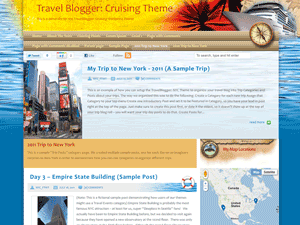
 Welcome Travelers! Seaward Bound theme offers ocean faring travel bloggers a highly customizable, very easy to use cruise ship designed theme that offers a gorgeous default skin and two color scheme change options (blue and green) with an easy one-click change. If none of the default options work for you, then this theme will allow you to completely customize the look and feel all the way down to menu colors, font colors, font types, font sizes, custom header graphics, custom background graphics (in the top and bottom of the theme) and custom footer graphics. It boasts an easy one-click layout change to 2 or 3 column with either left or right orientation options. This powerful cruise travelogue theme also offers built in social media controls for your Facebook, Twitter or Google+ sharing. It comes standard with custom widgets for featured posts and latest posts that can be used to group and display your trip posts easily. To make it even more ideal for the travel lover, it comes with an awesome Google Maps widget for plotting your trip locations – just enter a location in a post, and you can display all your destinations on one global map sidebar widget, or individual locations within the posts themselves. Finally, with this theme you can easily feature posts on the home page, as well as feature a different post on each Category page. All in all the Travel Blogger: Cruising theme is an extremely flexible travel theme that cruise travelers (or really anyone) can make their own!
Click here to view a demo of this theme.
New Theme Now Available for Downlaod!
- Added support for Google+ in social media controls
- Many SEO features
- Upper and lower background capabilities!
- Google Maps integration
- Many customizations!
- See the version notes on the download page for full details…
———————————————————————————————————–
>>>>>>>>>>> DOWNLOAD THEME HERE <<<<<<<<<<<<<
———————————————————————————————————–
Set Colors, Fonts & Images
This free travel blog theme packs many of the same powerful features you will find in similar premium themes. It is designed to allow you to completely customize how it looks, from the background images, to the headers and footers and all colors of everything in between! Make it your own, just like your trips and experiences on the road are one of a kind.
Built in Social Media
We created built in social media widgets, so your fans can follow you or share with their friends all the crazy things you did. But be careful, if you don’t want it spread around, don’t put it on the web! What happens in Vegas stays in Vegas (unless it’s on Facebook!).
Instant Designs
We also included 3 gorgeous instant designs for you to choose from. With a single click you can conjure up a new look and feel for your site with our default theme looks. Or as we stated before, you can upload all your own photos and choose your own colors for just about every area of the site’s layout.
Three Alternate Layouts
We made it super easy in Travel Blogger: Cruising to change the number of columns and their left or right side alignment with one click. Want to have your menus on the left, or maybe the right? Need more space for sidebar widgets? You can select 2 or 3 column layouts, and position them however you like.
Map Your Travels!
We even created a totally cool mapping feature, whereby you can create posts for each of the locations you visited and have them plotted on a Google map. You can have all your trip locations displayed in the global map widget in your sidebar, or inside each post you can display a map for that specific location. See, here is beautiful Bellevue, Washington:
Feature Your Exploits
We put in powerful controls over the “Featured Post” area in the header. You can have different featured posts on the Home page, and a unique featured post on each main Category page. Or, you can show a featured post only on the home page, leaving the rest of your site clean. Or, you can turn off all featured post areas in the header – make it your way!
Built In “Latest” and “Featured” Post Sidebar Widgets
Last but not least, we added some of the most useful sidebar tools – the kind of thing you always end up finding a plugin for anyway. Now you can feature selected posts in the “Featured Posts” widget. And in our “Latest Posts” widget, you can display the top posts from any category you set it to show. You can even place more than one Latest Posts widget to show posts from many different categories in your sidebars. Pretty powerful!
Upper and Lower Background capabilites
Now you can have even more control over the theme by stetting separate backgrounds for your site or blog! This gives almost endless opportunities to explore your creative side and create stunning designs for your site or blog! Check out the background settings in the Appearance tab for more details.
It’s All Up to You!
We sincerely hope you enjoy the Travel Blogger WordPress theme, and look forward to seeing what you do with it. Send us your questions through our Contact page here on this site. Happy travel blogging!
———————————————————————————————————–
>>>>>>>>>>> DOWNLOAD THEME HERE <<<<<<<<<<<<<
———————————————————————————————————–


Hi,how can delet social media google +1?
You would have to remove it from the CSS. There is no theme control for that, as it is a very big benefit for most sites to have the option for people to +1 their site.
There is no control built into the theme to delete the social media bar at this time, but it will be added in an update later.
why am i getting widgets in the primary sidebar when they have not been activated in admin???
Hi Brian, the reason there are widgets showing is that the theme displays a set of default widgets if none are set in the backend, that avoids having an empty space and most themes do this. As soon as you set your custom widgets the default ones will disappear.
I like the ability to display a map of our sailing destinations, but, if we want to plot progress on a blue water cruise, Is there a way to mark location on the google map display using lat/long coordinates? Is there an interface for automatic, periodic Iridium GPS coordinate updates?
Keep up the good work, this is very much what we are looking for
Hey David, .
.
I will have one of our developers get back to you about the different Google Maps settings you are asking about. We’ll be in touch soon, thank you for contacting us and for the compliments
- Travel Blogger Support